Cargo target directories: the 4 GB in every Rust project
Last updated: October 2026
Yes. target/ is compiler output and nothing else —
every byte in it is derived from your source and your lockfile, and
cargo build produces it again.
It costs you one full rebuild of the project and all its dependencies, from scratch, which on a large dependency tree is several minutes rather than the seconds an incremental build takes. Nothing is lost; the time is the whole price.
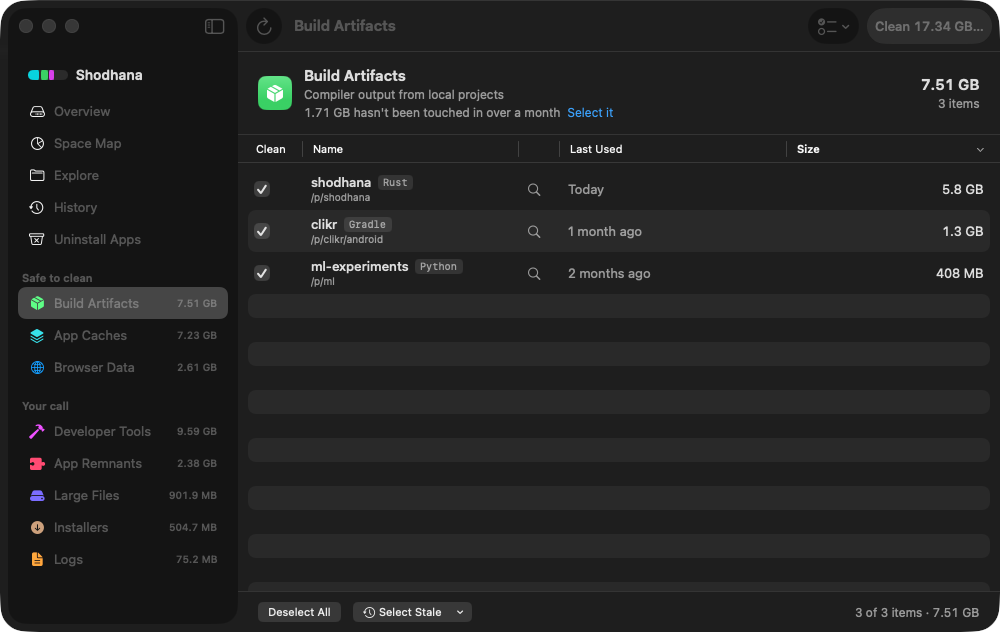
target/ directory is a row under Build
Artifacts only when a Cargo.toml sits beside it — the
manifest is the proof that it is Rust output, not a folder that happens
to be called target.Run this scan on your own Mac: download Shodhana — free for 14 days, Apple Silicon, macOS 14 or later.
What is actually in there
The repository this website is built from is a Rust project. Its
target/ was 4.2 GB when this was written, for a codebase of a
few tens of thousands of lines:
target/                    4.2 GB
  debug/                   3.9 GB
    deps/                  every dependency, compiled, with debug info
    incremental/           1.8 GB — per-crate incremental state
    build/                 build-script output
    .fingerprint/          what was built from what
  release/                 195 MB
  doc/                     cargo doc output, if you ever ran it
The ratio is typical. Debug builds carry full debug info, and
incremental compilation keeps a cache per crate so the next build can
skip what did not change. That cache is the fastest-growing part: it is
never pruned, so every variant of every crate you have compiled since the
last cargo clean is still in it.
Why it grows faster than the code
- Every dependency is compiled into it. A project with
300 transitive crates has 300 compiled crates in
deps/, each with debug info. The registry under~/.cargoonly holds the source; the compiled form lives in every project'starget/separately. - Every profile and feature set is a separate copy. Build with a feature on, then off, and both versions stay. Build debug and release and both stay. Cross-compile and there is a folder per target triple.
- Nothing is evicted. Update a dependency and the old
version's compiled artifacts remain until the next
clean. Three months of dependency updates can leave adeps/folder several times the size of the current build. - No sharing between projects. Ten Rust projects that
all depend on
tokiocompile it ten times into ten folders.
Find every target/ on the disk
A folder called target is Rust output only if a
Cargo.toml sits beside it — Maven uses the same name, and so
do plenty of unrelated things. This lists only the ones with the manifest,
with sizes, biggest last:
find ~/code -maxdepth 4 -type d -name target -prune \
  -exec sh -c 'test -f "$(dirname "$1")/Cargo.toml" && echo "$1"' _ {} \; \
  | xargs -I{} du -sh "{}" | sort -h
Point it at the folder your projects live in. Sort by what you can see
in the second column of ls -lt on those folders if the date
matters more than the size: a target last written six months ago belongs
to a project you are not building.
Delete safely
From inside a project, the tool's own command is the right one. It
knows about shared target directories and custom build paths, which
rm does not:
cargo cleanSmaller cuts, when you want the next build to stay fast:
cargo clean --release        # keep debug, drop the release build
cargo clean --doc            # drop the documentation build
rm -rf target/debug/incremental   # drop only the incremental cache
For projects you are not inside, the folder itself is fine to trash — there is no index to confuse, unlike a dependency cache. The folders all share one name, so give each a prefix on the way in:
mv ~/code/old-service/target ~/.Trash/old-service-targetStop it recurring: one target directory for everything
The ten-copies-of-tokio problem has a one-line fix. A shared target
directory makes every project build into the same place, where identical
dependency builds are reused across projects. In
~/.cargo/config.toml:
[build]
target-dir = "/Users/you/.cargo/shared-target"
Two things to know before switching. Paths that assume
./target — a Dockerfile, a CI script, a debugger launch
config — need updating. And one shared folder grows to the size of
everything, so it becomes the single place to run cargo clean
periodically rather than ten places to forget.
Not target/: the rest of ~/.cargo
~/.cargo/registry is the download cache of crate sources
and is safe to clear; it was 269 MB on the Mac above, and it re-downloads
on the next build. ~/.cargo/bin is different: it holds every
tool you ever installed with cargo install. Delete it and
those commands are gone until you install them again. The toolchains
themselves live in ~/.rustup, which rustup manages — remove an
old one with rustup toolchain uninstall, not by hand.
Read next
-
node_modules is eating my disk — what to do
The JavaScript version of the same folder, and the four cases where a reinstall does not reproduce it.
-
Homebrew, npm, pnpm and cargo cache sizes
The registry cache and every other toolchain cache in one table.
-
Python .venv and conda envs eating disk — find every one
The same count-them-all approach for virtual environments.
Shodhana lists every target/ that has a
Cargo.toml beside it under Build Artifacts, attributed to its
project and dated by last build, and never a folder that merely shares the
name. The registry downloads and git checkouts under ~/.cargo
appear under Developer Tools.
See the developer view.
Download the free trial Buy for $19, once Apple Silicon · macOS 14 or later · 14-day refund