Homebrew, npm, pnpm and cargo cache sizes
Last updated: August 2026
Every cache on this page is safe to clear. That is what makes it a cache: the tool can rebuild or re-download its contents.
The only cost is time and bandwidth — which is why the table below has a column for it. Two entries are not caches despite living alongside them, and both are called out.
Measure everything at once
Run this before clearing anything. Missing directories are skipped, so it works regardless of which toolchains you have installed:
for d in \
  ~/Library/Caches/Homebrew ~/.npm/_cacache ~/Library/pnpm/store \
  ~/Library/Caches/Yarn ~/.cargo/registry ~/.cargo/git \
  ~/go/pkg/mod ~/Library/Caches/go-build ~/Library/Caches/pip \
  ~/.cache/uv ~/Library/Caches/CocoaPods ~/.gradle/caches ~/.m2/repository \
  ~/Library/Developer/Xcode/DerivedData ~/.bun/install/cache ~/.deno; do
  [ -e "$d" ] && du -sh "$d" 2>/dev/null
done | sort -h
1.1G /Users/you/Library/Caches/Homebrew3.8G /Users/you/.cargo/registry6.2G /Users/you/.npm/_cacache12G /Users/you/go/pkg/mod41G /Users/you/Library/Developer/Xcode/DerivedData
The table
| Tool | Location | Clear with | Cost of clearing |
|---|---|---|---|
| Homebrew | ~/Library/Caches/Homebrew |
brew cleanup --prune=all |
Re-download on next install. Also drops old versions of installed formulae. |
| npm | ~/.npm/_cacache |
npm cache clean --force |
Next install fetches from the registry instead of disk. |
| pnpm | pnpm store path |
pnpm store prune |
None. Prune only drops packages no project links to. |
| Yarn | yarn cache dir |
yarn cache clean |
Re-download on next install. |
| Cargo | ~/.cargo/registry, ~/.cargo/git |
rm -rf ~/.cargo/registry/{cache,src} |
Re-download and re-extract crates. Keep ~/.cargo/bin — see below. |
| Rust builds | target/ per project |
cargo clean |
Full rebuild. Usually the largest Rust item by far. |
| Go modules | ~/go/pkg/mod |
go clean -modcache |
Re-download every module. Can be many gigabytes. |
| Go builds | ~/Library/Caches/go-build |
go clean -cache |
Next build recompiles everything. |
| pip | ~/Library/Caches/pip |
pip cache purge |
Re-download wheels. |
| uv | ~/.cache/uv |
uv cache clean |
Re-download and rebuild environments. |
| CocoaPods | ~/Library/Caches/CocoaPods |
pod cache clean --all |
Re-download pods on next install. |
| Gradle | ~/.gradle/caches |
rm -rf ~/.gradle/caches |
Re-download dependencies and rebuild. Slow first build afterwards. |
| Maven | ~/.m2/repository |
rm -rf ~/.m2/repository |
Re-download everything. Check for internally published artifacts first. |
| Bun | ~/.bun/install/cache |
bun pm cache rm |
Re-download on next install. |
| Xcode | ~/Library/Developer/Xcode/DerivedData |
See the full page | Full rebuild, re-index, SPM re-fetch. |
| Docker | Docker.raw | See the full page | Deleting inside does not shrink the file. Restart Docker after pruning. |
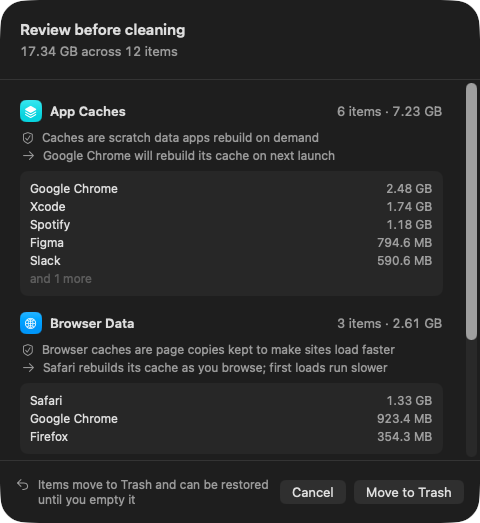
Run this scan on your own Mac: download Shodhana — free for 14 days, Apple Silicon, macOS 14 or later.
Two things in here that are not caches
~/.cargo/bin and internally published Maven artifacts.
~/.cargo/bin holds every tool you installed with
cargo install — it sits inside the Cargo directory but nothing
re-downloads it, and rm -rf ~/.cargo removes your whole Rust
tool set. Clear registry/cache and registry/src
specifically.
~/.m2/repository can contain artifacts published locally
with mvn install and never pushed to any remote. Those are not
re-downloadable; they only exist on your machine.
Homebrew is usually bigger than the cache suggests
The download cache is the small half. Homebrew also keeps old versions of every formula it has upgraded, in the Cellar:
brew cleanup -nbrew cleanup --prune=allbrew autoremove
-n is a dry run that prints what would go and how much it
frees. autoremove then removes formulae that were installed only
as dependencies of something you have since uninstalled.
The three that dwarf the rest
Missing from most versions of this list, and usually larger than everything in the table combined:
| What | Location | Typical | Notes |
|---|---|---|---|
| Android SDK | ~/Library/Android/sdk | 20–80 GB | system-images is nearly all of it — one per API level per architecture, kept forever. Remove unused levels in Android Studio's SDK Manager. |
| JetBrains | ~/Library/Caches/JetBrains | 5–40 GB | Indexes and shared caches for every IDE version ever installed, including ones you have uninstalled. |
| Conda | ~/miniconda3/pkgs | 5–30 GB | conda clean --all. Package tarballs are kept after extraction by default. |
The JetBrains one is worth checking even if you switched editors years ago — uninstalling an IDE leaves its caches behind, and each major version keeps its own directory.
A routine that keeps it flat
Four commands, no consequences, roughly monthly:
brew cleanup --prune=all && brew autoremovedocker buildx prune -fpnpm store prunexcrun simctl delete unavailable
Every one of these removes only what is provably unreferenced or re-downloadable. None asks you to decide anything, which is what makes it a routine rather than a project.
Where the real space actually is
The caches in this table are the reproducible part, and they are rarely the largest. On most developer Macs the ordering is:
- Per-project build output — Rust
target/, Xcode DerivedData,node_modules. Not in any global cache directory, so nothing here finds them. - Docker — one file, frequently 40–80 GB.
- Global caches — everything in the table above, typically 10–30 GB combined.
Which is why clearing every cache on this page can free 20 GB while the
190 GB in abandoned target/ and node_modules
directories goes untouched. Those are per-project, scattered across your
home folder, and they only have a safe answer when you can see which project
each one belongs to and when it was last built.
Read next
-
node_modules is eating my disk — what to do
Count them without double-counting, and sort by last commit rather than size.
-
Is it safe to delete Xcode DerivedData?
Yes — and the sibling folder that costs you crash reports permanently.
-
macOS System Data is huge — what's actually in it
Where all of this lands in the Storage pane, and what else is in there.
-
Hugging Face cache is 50 GB on my Mac — don't rm -rf it
The one cache folder on this page's list that is not safe to clear wholesale, and the tool that prunes it properly.
Shodhana finds the per-project half of this list — every
target/, node_modules, and DerivedData directory
verified against its project's manifest, sized, and dated by last use, so a
folder that merely shares a name is never touched.
See the developer view.
Download the free trial Buy for $19, once Apple Silicon · macOS 14 or later · 14-day refund