Is it safe to delete Xcode DerivedData?
Last updated: August 2026
Yes. Everything in DerivedData is derived from your source and regenerates on the next build.
It costs you one full rebuild, a re-index, and — if you use Swift Package Manager — a network round trip to re-fetch package checkouts. Don't do it right before a flight.
du -sh ~/Library/Developer/Xcode/DerivedData94G /Users/you/Library/Developer/Xcode/DerivedData
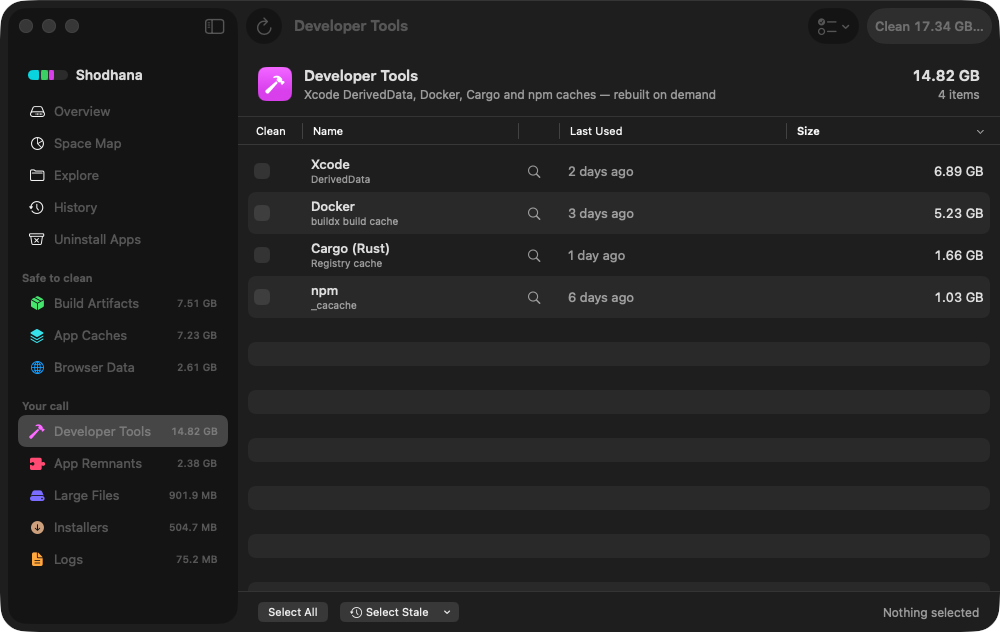
Run this scan on your own Mac: download Shodhana — free for 14 days, Apple Silicon, macOS 14 or later.
What is actually in there
DerivedData is Xcode's scratch space, one subfolder per project:
- Build/Intermediates.noindex — object files, generated headers, module caches. The bulk of the size.
- Build/Products — the compiled
.appor framework. - Index.noindex — the code index behind jump-to-definition, autocomplete, and Find Call Hierarchy.
- Logs — build and test logs from previous runs.
- SourcePackages — resolved Swift Package Manager checkouts, for projects that use them.
None of it is authored by you. Delete the lot and Xcode rebuilds it without complaint:
rm -rf ~/Library/Developer/Xcode/DerivedData/*Quit Xcode first. Deleting the index out from under a running instance leaves autocomplete broken until you restart it anyway.
The one real cost: Swift Package Manager
This is the caveat that surprises people. SPM checkouts live
inside DerivedData, at
<Project>-<hash>/SourcePackages/checkouts. Clearing
DerivedData deletes them, so your next build re-resolves every dependency
over the network.
That is fine on a good connection. It is not fine offline, and it is not fine if a dependency's git host is having a bad day — you will be unable to build a project that compiled perfectly ten minutes earlier. If you need the space but want to keep the checkouts, delete the build directories only:
rm -rf ~/Library/Developer/Xcode/DerivedData/*/BuildDo not delete: Archives
~/Library/Developer/Xcode/Archives
Archives hold the dSYM debug symbols for builds you have shipped. Without the dSYM for a given build, crash reports from that version can never be symbolicated — you permanently lose the ability to read crash logs from every user still on that release. It is one of the few folders on a developer Mac with genuinely irreplaceable contents.
Archives are large, they sit one directory away from DerivedData, and "clean out ~/Library/Developer/Xcode" advice sweeps them up routinely. Keep an archive for every version still in the wild. Archives for versions nobody runs any more are safe to remove.
The same caution applies to
~/Library/Developer/Xcode/UserData, which holds your code
snippets, key bindings, themes, and breakpoints. Small, and annoying to
rebuild by hand.
Clean Build Folder is not the same thing
Three operations get used interchangeably and do different amounts of damage. In increasing order:
- Product → Clean Build Folder (⇧⌘K) removes the current scheme's build products and intermediates. The index survives, so autocomplete keeps working and the folder refills only for that scheme.
- Deleting one project's DerivedData folder removes its build output and its index and SPM checkouts, but leaves every other project alone.
- Deleting the whole directory does that for every project you have ever opened, including ones you are not debugging.
If you are here to fix a stale-build problem rather than to free space, Clean Build Folder is almost always the correct tool and costs a fraction of the rebuild time.
One shared item is worth knowing about:
DerivedData/ModuleCache.noindex holds precompiled module
artifacts shared across projects. It is safe, it is often several gigabytes,
and it is a common cause of "impossible" compiler errors that vanish after
clearing it.
Move it instead of clearing it
If you have an external drive, DerivedData does not have to live on your
startup disk. Xcode → Settings → Locations → Derived Data lets you set a
custom path, or switch to Relative to Workspace, which puts each
project's build output in a DerivedData folder beside its own
source.
Relative placement is the better default on a machine that is short on space: build output lives with the project, so deleting a project takes its build artifacts with it, and nothing accumulates under a hashed name for something you removed two years ago.
The rest of the Xcode footprint
DerivedData is rarely the largest item. The full picture:
| Folder | Typical | Safe? | What deleting costs |
|---|---|---|---|
| DerivedData | 10–100 GB | Yes | One full rebuild, re-index, SPM re-fetch. |
| iOS DeviceSupport | 5–60 GB | Yes | Symbols re-download next time you attach a device running that iOS version. Needs the physical device. |
| CoreSimulator/Devices | 5–80 GB | Mostly | Simulator app data, logins, and databases are wiped. The simulators themselves come back. |
| Caches/com.apple.dt.Xcode | 1–20 GB | Yes | Nothing meaningful. |
| Archives | 2–50 GB | No | Crash reports from shipped builds become unreadable, permanently. |
For simulators, the targeted command beats deleting the folder — it removes only devices whose runtimes are no longer installed, leaving your working simulators and their data intact:
xcrun simctl delete unavailableWhy it grows back so fast
Xcode never garbage-collects DerivedData. A project you last opened in 2023 keeps its full build directory forever, under a folder name with a hash in it that gives no hint which project it belongs to. On most developer Macs the majority of DerivedData belongs to projects that no longer exist on disk.
That is the actual recurring problem, and it is why "delete everything and rebuild" is the usual advice — telling stale from active by hand means decoding hashed folder names one at a time.
Read next
-
Homebrew, npm, pnpm and cargo cache sizes
One page, one table: where each toolchain hides its cache, how to measure it, and what clearing it costs.
-
node_modules is eating my disk — what to do
The count-them-all command, and the four cases where reinstalling will not reproduce what you deleted.
-
Where did my Mac's disk space go?
Why deleting 40 GB sometimes frees nothing at all.
Shodhana finds these per project rather than per folder — each DerivedData directory resolved back to the project that owns it, dated by last build, with Archives among the paths it refuses to touch.
Download the free trial Buy for $19, once Apple Silicon · macOS 14 or later · 14-day refund