Python .venv and conda envs eating disk — find every one
Last updated: October 2026
A virtual environment is a folder of installed packages, and
reinstalling them takes one command — if something recorded
which packages at which versions. A requirements.txt, a
pyproject.toml with a lockfile, an environment.yml.
Without one, the environment itself is the only record of the versions that worked together. That is the common case on an old project, and it is the one case where deleting costs you something a reinstall cannot give back. Thirty seconds of insurance fixes it; it is below.
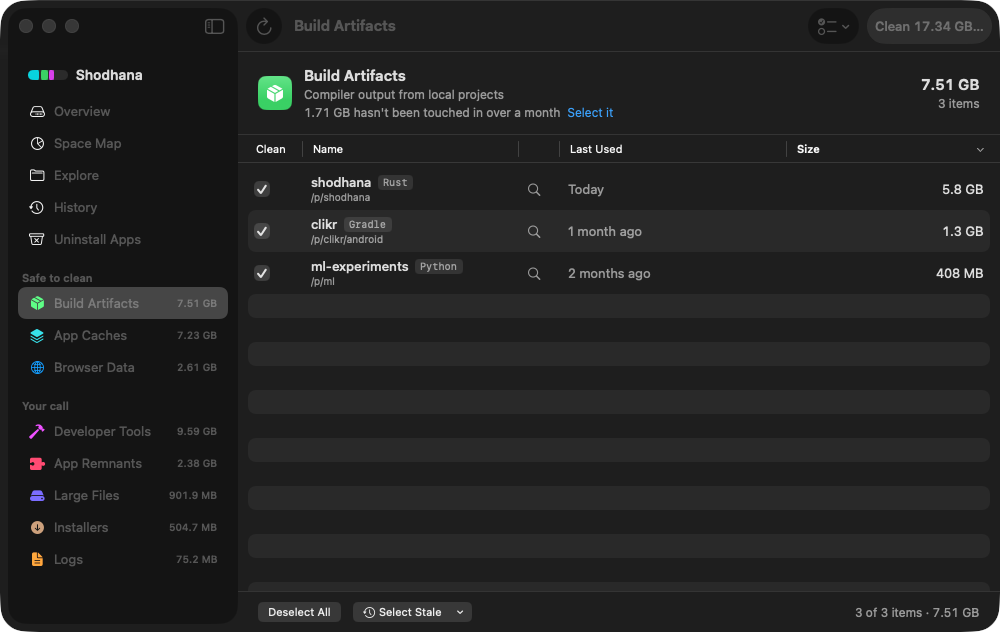
.venv is a row under Build Artifacts only
when a Python project sits around it, attributed to that project and
dated by last use. The two-month-old one is the kind this page is
about.Run this scan on your own Mac: download Shodhana — free for 14 days, Apple Silicon, macOS 14 or later.
Why they are bigger than you think
A virtual environment copies nothing from the system Python — it links
to it — but every package it installs is a full copy inside
lib/python3.x/site-packages. The scientific stack is where
the size is: NumPy, SciPy and pandas together are a few hundred
megabytes; PyTorch on Apple Silicon is around a gigabyte before you add
anything that depends on it. A data-science project's environment is
commonly 1–3 GB, and every project has its own.
Then there are the environments you do not think of as yours: the one
a tool created under ~/.local, the Jupyter kernel from a
course, the venv inside a cloned repository you evaluated
once. Each is a folder with no project of its own to remind you.
Find every one
Every virtual environment made by venv, virtualenv,
uv or Poetry contains a pyvenv.cfg at its root.
That file is the reliable marker — folder names are not, since people
call them .venv, venv, env and
.env interchangeably. This finds them all under your home,
skipping the copies buried inside node_modules, with sizes,
biggest last:
find ~ -maxdepth 6 -name pyvenv.cfg -not -path '*/node_modules/*' -not -path '*/Library/*' 2>/dev/null \
  | xargs -I{} dirname "{}" | xargs -I{} du -sh "{}" | sort -h
Conda keeps its environments in one place and can list them itself:
conda env listdu -sh ~/miniconda3/envs/* 2>/dev/null | sort -hThirty seconds of insurance
Before deleting an environment whose project has no lockfile, write one. It costs nothing and turns the environment from the only record into a disposable copy of one:
~/code/old-analysis/.venv/bin/pip freeze > ~/code/old-analysis/requirements-frozen.txtFor conda:
conda env export -n old-analysis > ~/code/old-analysis/environment.ymlCommit the file next to the code. Now a reinstall reproduces exactly what was there, native-module versions and all, and the environment can go.
Delete safely
Send them to the Trash rather than rm -rf. They all share a
name, so each is renamed by its project on the way in — the same trick as
for node_modules:
find ~/code -maxdepth 5 -name pyvenv.cfg -not -path '*/node_modules/*' -print0 \
  | while IFS= read -r -d '' cfg; do
      d="$(dirname "$cfg")"
      mv "$d" ~/.Trash/"$(basename "$(dirname "$d")")-$(basename "$d")-$RANDOM"
    done
Note the explicit directory. Rooted at ~, this takes the
environment of whatever you have open right now, too. Conda environments
go through conda, which also updates its registry:
conda env remove -n old-analysisThe caches behind the environments
Each installer keeps a download cache so a reinstall does not hit the
network. These are safe to clear wholesale, and on a Mac that has
installed PyTorch a few times they are not small — uv's was
2.4 GB on the Mac this was written on:
uv cache cleanpip cache purgeconda clean --allThe cost of each is the next install re-downloading what it needs. None of them touches an environment.
Do not delete: environments something else points at
A Jupyter kernel is a pointer to a Python inside some environment.
Delete that environment and the kernel is listed, selectable, and dead.
jupyter kernelspec list shows which environments are
registered; remove the kernel with jupyter kernelspec remove
when you remove its environment. The same applies to anything a launch
agent or editor config runs by absolute path — and to conda's
base, which is conda itself.
Read next
-
node_modules is eating my disk — what to do
The same problem in JavaScript, with the lockfile check that this page's insurance is modelled on.
-
Hugging Face cache is 50 GB on my Mac — don't rm -rf it
Where a data-science Mac's other gigabytes went, and why that folder is not a cache.
-
Cargo target directories: the 4 GB in every Rust project
The same count-them-all approach for Rust build output.
Shodhana lists each .venv or venv
that belongs to a Python project under Build Artifacts, attributed to the
project and dated by last use, along with __pycache__ and
.nox folders; the uv and pyenv download caches
appear under Developer Tools. A folder that merely shares the name, with
no project around it, is never touched.
See the developer view.
Download the free trial Buy for $19, once Apple Silicon · macOS 14 or later · 14-day refund