Hugging Face cache is 50 GB on my Mac — don't rm -rf it
Last updated: October 2026
~/.cache/huggingface is not one cache. It is a download
cache you can prune, a transfer cache you can drop, and a home for
whatever else the Hugging Face libraries — or you — chose to keep there:
your login token, datasets prepared locally over hours, a fine-tune
that exists on no server anywhere.
The download cache has its own tool that knows which files are shared
between models. Use that. rm -rf on the folder takes all
three things at once, and only one of them comes back.
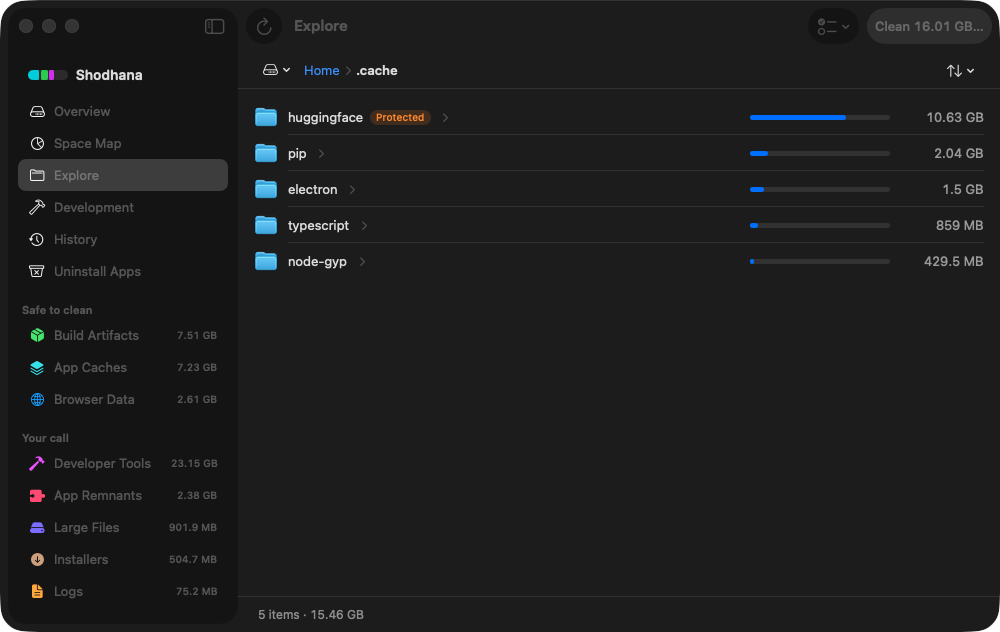
~/.cache. The badge is
the deleter's verdict, shown before you ask: Shodhana will not delete
this folder, because it cannot tell a downloaded model from a trained
one.Run this scan on your own Mac: download Shodhana — free for 14 days, Apple Silicon, macOS 14 or later.
What is actually in there
~/.cache/huggingface/
  hub/                 every model, dataset and Space you ever loaded
    models--meta-llama--Llama-3.2-1B-Instruct/
      blobs/           the real files, named by hash
      refs/            which commit "main" points at
      snapshots/       one folder per revision — symlinks into blobs/
  xet/                 upload shards and resumable-transfer scratch
  datasets/            Arrow files the datasets library prepared locally
  token                your hf auth login
  …                    anything a library or a training script put here
hub/ is the part people mean when they say "the cache".
Every from_pretrained call lands here, one folder per
repository, and the layout is deliberately clever: a revision is a folder
of symlinks into blobs/, so two revisions that share a weight
file store it once. Newer versions of the library go further and share
identical files across repositories, with a small manifest next to
each shared blob recording who still uses it. A 7B model is 14 GB in
there; a few experiments with quantised variants and you are at 50.
The library writes a CACHEDIR.TAG into hub/,
which is its own formal statement that the contents are re-downloadable.
That statement covers hub/. It does not cover the folder
above it.
Why rm -rf costs more than a re-download
- Your login goes with it.
hf auth loginstores the token in this folder. Every gated model — Llama, Gemma, most things worth 14 GB — needs that token to download again, and some need the licence re-accepted on the website first. - A fine-tune is not a download. Training scripts and
notebooks routinely point their output at
HF_HOMEbecause it is the path they already know. Checkpoints saved there cost GPU hours and exist nowhere on the Hub. There is no re-download for your own weights. - Prepared datasets are hours, not bytes. The
datasetslibrary caches the Arrow files it built from raw downloads. The raw download is cheap to repeat; the preprocessing that produced the Arrow files may not be. - Deleting a repo folder by hand can break a different model.
With shared blobs, the file you remove from one
models--folder may be the file another repository's snapshot links to. The library's own tool reads the manifests and knows; Finder does not.
Measure it properly
Start with the folder, split by part, so you know which of the three things is the big one:
du -sh ~/.cache/huggingface/* 2>/dev/null | sort -hIf the folder is small and your disk is still full, the cache has been
moved — HF_HOME or HF_HUB_CACHE relocates it, and
a training setup often sets one of them:
echo "${HF_HOME:-unset} ${HF_HUB_CACHE:-unset}"Then ask the library itself. The hf command ships with
huggingface_hub (pip install -U huggingface_hub,
or the standalone installer on the Hub). It lists what is cached by
repository, with the size and when each was last used:
hf cache ls --sort size:descThat last-accessed column is the one that decides. A model you loaded yesterday is in use. One untouched for a year is a candidate, whatever its size.
Prune it with the tool that understands it
Delete whole repositories you no longer load, oldest first. The first command only shows what would go; the second does it:
hf cache rm $(hf cache ls --filter "accessed>90d" -q) --dry-runhf cache rm $(hf cache ls --filter "accessed>90d" -q)Then collect the garbage that no revision references any more:
snapshots left behind when a branch moved on, half-finished
.incomplete downloads, shared blobs nothing uses. This is the
part a hand-cleanup never finds:
hf cache pruneBoth commands ask before deleting and accept --dry-run.
Anything they remove is a download away — that is the whole definition
of what they are allowed to touch.
xet/ is the exception where a plain delete is fine. It
holds upload shards and resumable-transfer scratch, expires itself after a
few weeks, and the library's own documentation says to remove it whole if
you need the space:
rm -rf ~/.cache/huggingface/xetDo not delete: blobs/ by hand
~/.cache/huggingface/hub/models--*/blobs/
Everything in snapshots/ is a symlink into this folder.
Delete a blob and the model still appears to be there — the snapshot
folder is intact, every filename is present — but each one points at
nothing, and the failure shows up as a load error later, in whatever
script runs next. If you suspect this has already happened,
hf cache verify <repo> checks every file against the
Hub's checksums.
Read next
-
Homebrew, npm, pnpm and cargo cache sizes
The caches that are safe to clear wholesale, with the command for each.
-
macOS System Data is huge — what's actually in it
Why ~/.cache and ~/Library/Caches are counted under one opaque bar, and how to see inside it.
-
Where did my Mac's disk space go?
Why deleting 40 GB sometimes frees nothing at all.
Shodhana never offers ~/.cache/huggingface
in a scan, and in Explore it marks the folder Protected with the reason
shown above — a model store may hold local training no download brings
back. The two exceptions are the ones this page describes:
hub/ and xet/ inside it are pure download caches,
and those it will send to the Trash on request, because deleting them
costs a re-download and nothing else.
See how it decides.
Download the free trial Buy for $19, once Apple Silicon · macOS 14 or later · 14-day refund