Ollama and LM Studio models on a Mac — where they live, how to prune them
Last updated: October 2026
Ollama's store is content-addressed: one model is a list of layers,
and layers are shared between models. Delete a file inside it and every
model that referenced that layer is broken, not just the one you meant.
ollama rm knows which layers nothing else uses. Finder does
not.
LM Studio's store is plain files, one folder per model, and those you can remove — but from inside the app, so its index agrees with the disk.
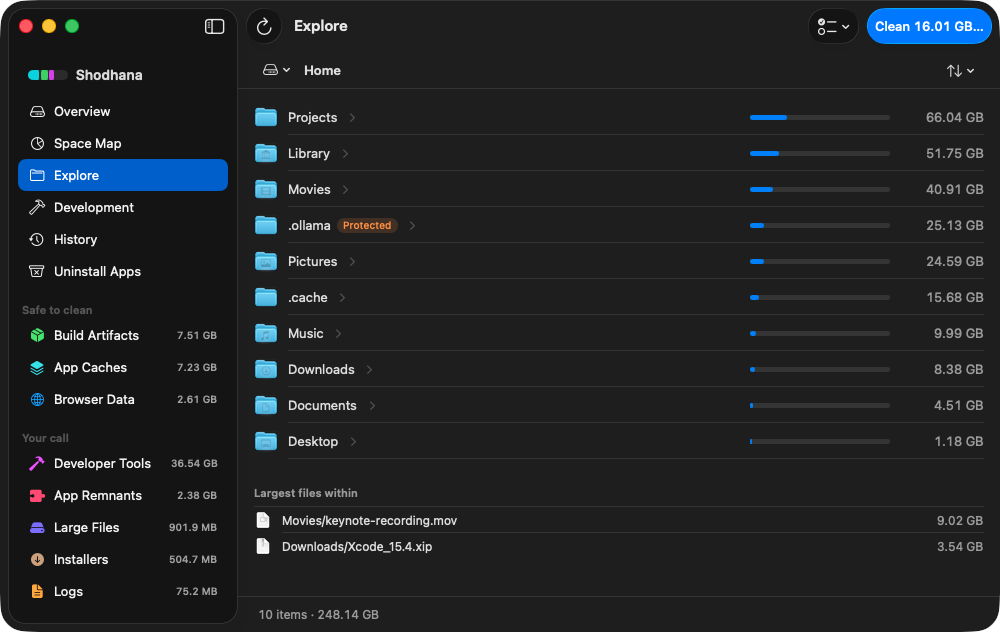
~/.ollama/models with
it — so the ancestor is refused too, and says why.Run this scan on your own Mac: download Shodhana — free for 14 days, Apple Silicon, macOS 14 or later.
Where the gigabytes are
~/.ollama/
  models/
    blobs/        sha256-… — the layers; weights, templates, parameters
    manifests/    registry.ollama.ai/library/llama3.2/latest → which blobs
  id_ed25519     the key this Mac signs pushes with

~/.lmstudio/
  models/
    publisher/
      model-name/
        model-name-Q4_K_M.gguf
An Ollama model is a manifest naming a handful of blobs. The big blob is
the weights, and it is the same file for every tag that shares them:
llama3.2:latest and llama3.2:3b are two manifests
pointing at one 2 GB layer. That sharing is why the folder is smaller than
the sum of ollama list, and why deleting any single blob by
hand is a mistake with a blast radius.
LM Studio keeps the model as a GGUF file in a folder named for its publisher and repository, as downloaded from the Hub. No sharing, no manifests: one model, one folder.
Sizes scale with parameters and quantisation. A 7–8B model at 4-bit is 4–5 GB; a 30B-class model is 18–20 GB; a 70B is 40. Five models tried and forgotten is a 60 GB folder that no cleanup tool will show you, because no cleanup tool knows which ones you still run.
Why rm -rf is the wrong tool here
- Shared layers. Covered above: a blob removed by hand
breaks every model that lists it, and the manifest still claims the
model is installed. The failure appears later, on the next
ollama run. - Models you built are in the same folder.
ollama createfrom a Modelfile — your system prompt, your parameters, an adapter you trained — writes layers into the sameblobs/. So does importing a GGUF or safetensors fine-tune. Those layers are on no registry. There is no re-pull for them. - The download is the expensive part. A 40 GB model at a realistic home connection is an evening. Deleting a 4 GB one you use daily costs you that evening for nothing.
Measure, then list
du -sh ~/.ollama/models ~/.lmstudio/models 2>/dev/nullThen ask each app, because the app's list carries the date and the name, and the folder carries neither:
ollama listlms lsThe MODIFIED column in ollama list is when the
model was pulled or rebuilt, not when it was last run. Ollama does not
record last use. If you want that signal, ollama ps shows what
is loaded right now, and your own memory does the rest — a model you cannot
remember running is the one to drop.
Prune Ollama with ollama rm
ollama rm llama3.2:3bThat removes the manifest and every layer no remaining model shares. Several at once is fine:
ollama rm mistral:7b codellama:13b gemma2:27bA model you are mid-chat with should be stopped first, with
ollama stop <name>, or just quit the app. Interrupted
pulls leave partial blobs behind; Ollama cleans those itself on its next
start.
Prune LM Studio from My Models
Open the My Models tab, find the model, and delete it
there. The app removes the folder and drops it from its index in one step.
The lms command can list, load and unload, but it has no
delete — that lives in the app on purpose.
If you would rather do it in the Finder: quit LM Studio first, trash the
publisher/model-name folder, and the app re-indexes on
launch. Trash the whole models/ folder and you have deleted
every model including the ones you use, which is the usual outcome of
cleaning by folder name.
Move the store instead of shrinking it
The models are big because they are meant to be. If the problem is that they live on a small internal disk, both apps let you point the store at an external one.
Ollama reads OLLAMA_MODELS. For the menu-bar app on macOS,
the environment has to be set where launched apps can see it, then the app
restarted:
launchctl setenv OLLAMA_MODELS /Volumes/External/ollama-modelsMove the existing models/ folder there first so nothing
re-downloads. LM Studio changes its directory from the My Models tab, and
the lms command follows whatever the app is set to.
Do not delete: blobs/ by hand
~/.ollama/models/blobs/
The sha256 names tell you nothing about which model owns a file,
because several do. One removed layer and every model that shares it
fails to load, while ollama list goes on reporting them as
present. If that has already happened, ollama pull for each
affected model fetches only the missing layers.
Read next
-
Hugging Face cache is 50 GB on my Mac — don't rm -rf it
The other model store on a developer's Mac, and the tool that prunes it properly.
-
Homebrew, npm, pnpm and cargo cache sizes
The caches that are safe to clear wholesale, with the command for each.
-
Where did my Mac's disk space go?
Why deleting 40 GB sometimes frees nothing at all.
Shodhana never offers ~/.ollama/models,
~/.lmstudio/models or LM Studio's older
~/.cache/lm-studio in a scan, and refuses them at delete
time even if asked. In Explore they carry a Protected badge with the
reason — a model store may hold local training no download brings back
— and so does any parent folder whose removal would take one with it.
See how it decides.
Download the free trial Buy for $19, once Apple Silicon · macOS 14 or later · 14-day refund